
The AI Project Brain: A Simple Notion System That Gives AI Instant Context

If you're using AI in your projects, you've probably bounced between different models: one for writing, another for research, maybe a third for planning. And if you're like me, you've hit the same wall. Every new chat feels like Groundhog Day. You're re-explaining your project, past decisions, your tone of voice, or copy-pasting huge chunks from one platform into another just to keep them aligned.
Why can't AI just remember?
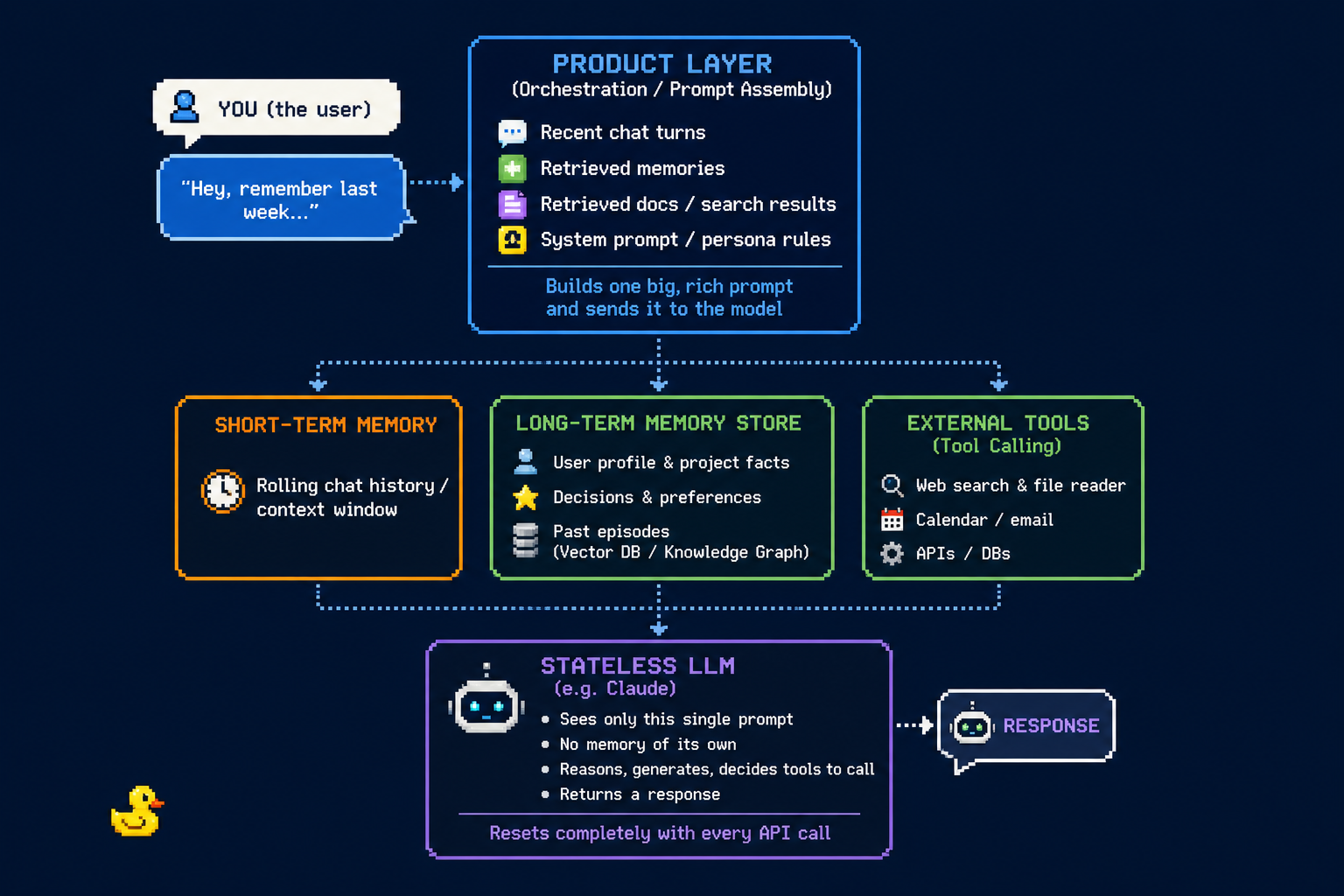
When researching a solution to my problem, I quickly started to realise there was far more to an AI platform than what you and I normally see on the screen. An AI platform like Claude or ChatGPT has at its core multiple large language models, LLMs. You'll know them by names like Claude Sonnet 4.6 or GPT-5. These are the models our prompts get fed into to produce the answers you and I receive. The problem is, LLMs are stateless. They have no memory and each prompt is independent. They will only ever see whatever text is inside the current context window. This is what led me to the missing piece in my thinking: the product layer that wraps around the LLM.
What is a product layer?
I've heard it called an AI wrapper, AI harness, AI platform, orchestration layer, but I call it the product layer. There are many different product layers out there, some we're more familiar with, like Claude or ChatGPT. These product layers wrap around models, though not interchangeably. Claude wraps around Anthropic's Claude models exclusively, and ChatGPT wraps around OpenAI's GPT models. Perplexity is the exception: it uses its own models but also offers access to third-party models from providers like OpenAI and Anthropic. The product layer contains the chat interface you and I use, the tools we can connect to, the different memory systems we have access to. It even decides what pieces of history, files, and rules to send to the LLM.
What does this mean for me:
- I use Claude as my core product layer
- I design project brains that operate inside this layer
- Each brain works within Claude's constraints
- I'm building repeatable, reliable architecture patterns
My AI Project Brain V1
The way I've designed my project brain is through a 7-page knowledge base and context system. It sits externally in Notion and holds everything an AI should know about a project across 7 pages. Each page contains the necessary information the model would need to orient itself to the project.
I've been mindful about learning the context window specifications for the various LLM models I'll be using, and I've had Claude build each page to work within those limitations. Why? Even working with frontier models, I want a decent amount of tokens available within the context window for actual task work, not eaten up by instructions.
How do the LLMs interact with the brain?
In my system, I work across 3 AI platforms: Claude, ChatGPT, and Perplexity. Partly because I like certain outputs across the platforms, but also because I quickly reach my usage limits with Claude. At the moment, I can't justify jumping up to Claude Max, so I outsource to the other platforms where I can.
Claude is the leader across the platforms. By design, it's the only one with full read and write access across the brain. The other platforms are intentionally limited to writing only to the Outputs page, which keeps the brain clean and Claude in control of the project record. I also have individual Claude projects with unique instructions that are loaded into the system prompt at the start of every conversation within that project.
These instructions tell Claude to connect to the Notion MCP server and read the necessary brain pages to orient itself to the project. The other AI platforms will only ever need to read one page within the brain, and this acts as an Active Handover. This handover page is updated by Claude when work needs to be outsourced to another platform. I'll then start a new chat there, instructing it to read its task for the day. When that work feeds into a next step, the platform connects back to the Notion MCP server and drops its output directly into the Outputs page. Claude picks it up from there, and the chain continues without me copying anything between platforms.
Individually, their roles look like this:
- Claude is the chief of staff. Strategy, planning, synthesis. Writes to this brain.
- ChatGPT is the worker. Executes tasks via the Active Handover brief.
- Perplexity is the research arm. Investigates topics via the Active Handover brief.
How I structure each brain
This is how I have structured my project brains. It's a personal design, built through experimentation. Not an established framework, not an endorsed methodology. Seven pages, each one serving a single purpose.
Page 1: Project Context
This is the "what and why" page. You pull it in before any strategic or creative work so the AI has context before it does anything.
Page 2: Status and Next Steps
What's done, what's in flight, and what's next.
Page 3: Decisions Log
A short list of decisions that are still shaping how the project runs. Not a full archive of everything you've ever decided. You pull this in when you're making directional calls or course-correcting. Given how much this page grows over time, I only load it when the task is light enough that I have room for it in the context window. Working through a lot of options with Claude? Leave this one out.
Page 4: Toolbox and Manual
The tools, platforms, and fixed constraints the AI should know about. What you're working with, how it connects, what the rules are. Keeps the AI grounded in your actual environment rather than a generic one.
Page 5: Active Handover
The current brief for ChatGPT or Perplexity. Overwritten each time a new task comes up. I've also built instructions into Claude on how to best format the brief for each platform. This keeps context windows lean and ensures I get the responses I need.
Page 6: Handover Archive. When the outsourced work is complete, I notify Claude, who archives the Active Handover brief here.
Page 7: Outputs
Where ChatGPT or Perplexity drop their work when it feeds into a next step. Rather than me copying outputs between platforms, they connect to the Notion MCP server and write directly here. Claude picks it up and continues the chain. Not every task needs this. If the output comes straight back to me and I act on it myself, Outputs stays empty. It's for chain work, where one platform's result is another's starting point.
That's it. Seven pages, with specific instructions built into Claude to ensure the necessary pages always stay within the constraints of each AI platform.
How to build your own
Before you set anything up, one thing to avoid: don't overload your project instructions or add files into your AI platform's project settings. Those instructions get pulled into the context window on every single chat, whether they're relevant or not. It's wasted space, and it adds up fast. Keep everything in your seven pages instead, and bring in only what each task actually needs.
If you want to try this for yourself, the setup is simpler than it sounds.
Start with one project. Not your most complex one. Pick something active enough that you actually have context to capture.
Create seven pages in whatever tool you use for project notes. Notion works well, but it doesn't have to be Notion.
When you're ready to start a task, you have two options for getting the right pages into your AI's context window. The easiest and cheapest way is to copy and paste the necessary brain pages into the chat. Or the path I chose, which was to build instructions into the project that automatically connect your AI tool to Notion via MCP and pull in the relevant pages. The MCP route is faster but can burn through your context window and usage limits more quickly, which you'll notice if you're on Claude. That's because each MCP tool call and its response consumes tokens, sometimes significantly depending on how much content is being pulled. Pasting manually gives you more control and keeps things leaner.
Either way, only bring in the pages that task actually needs. That's the whole discipline.
Update the pages when something changes. Not after every session. Only when something that lives on that page is actually different.
The AI brain you actually control
Here's the reframe that changed how I think about all of this. The intelligence isn't in the model. Claude, ChatGPT, Perplexity. They're just readers. The actual brain is the structure you build around them. The seven pages, the discipline of what you pull in and when, the single source of truth that every tool points back to. That's where the thinking lives.
Once I saw it that way, the tools stopped feeling like magic boxes I had to figure out. They became front-ends to my project library. Interchangeable, and a lot less precious.
If you try one thing from this post, make it this: pick one project and build the seven pages. Keep them lean. Then start a task and paste in only what that task needs. Notice how different the conversation feels when the AI already has the right context before you type a single word.
That's the whole idea. You're not hoping the AI remembers. You're making sure it always knows. 🦆
If this was useful, I'd love to hear from you. I share what I'm building as I build it. The wins, the mess, and everything in between.